
Give your parameters a type — numbers, currencies, and yes/no
Kortlist parameters now know whether they hold text, a number, a currency, or a yes/no answer — and format themselves accordingly. Plus a live board you can thumb through.
A spec sheet is full of different kinds of things. “Matte black” is not the same kind of thing as “€799”, which is not the same kind of thing as “yes, it has HEPA”. Up until now Kortlist treated every cell the same — a string of characters in a box. That worked, but it meant you did the formatting yourself: writing “€” in front of every price, remembering whether you’d typed “yes” or “Yes” or “Y” or “✓”, squinting at a column of unaligned numbers.
Parameters now have a type. Four of them, starting today: text, number, yes/no, and number → currency as a sub-format of number. Tell Kortlist what a column holds, and it handles the presentation.
The four shapes
Text is still the default — short strings, free-form. “Matte black”, “USB-C × 2”, whatever the page says.
Number accepts anything you type (“1,299.50”, “1.299,50”, “€1,290”, “4.4 s”) and reformats it with your locale’s thousands separator. Sort works too — a number column sorts numerically, not alphabetically, so 120 no longer sits above 9.
Number → currency is the same parser with a currency code attached. Kortlist pairs the parsed value with the right symbol and narrow-symbol formatting for the user’s locale. €799 stays €799 for you and appears as $799 for a collaborator in the US if they switch the code. You pick the code once per column; every cell on that column gets the treatment.
Yes/No turns a cell into a switch — no more typing “true” in one row,
“Yes” in the next, “✓” in the third. The input becomes a toggle, and the
board shows a checkmark or a cross. Scan URL understands boolean columns
too: the scraper returns "true" or "false" exactly, so a page that
mentions “Bluetooth: yes” fills in as a green check.
See it in action
Eight parameters, four cordless stick vacuums, mixed types across the board. The suction number is a plain number (sortable). The price is a currency. HEPA, auto-empty, mopping, and LED are yes/no. Thumb up what matters to you and watch the stack re-rank:
Notice the currency column: every row shows €-formatted prices even though the underlying value is just a number. Change the column type on your own board and the whole column updates — there’s no per-row editing step.
Where to set the type
In three places, all built off the same picker:
New board dialog. Click into a parameter row and the type picker slides in below the name. Pick Number and a second row appears with the Plain / Currency sub-format.
Parameter settings. Open any existing parameter from the header → gear icon. Change the type, change the format, save. Your cells stay put; only the rendering changes.
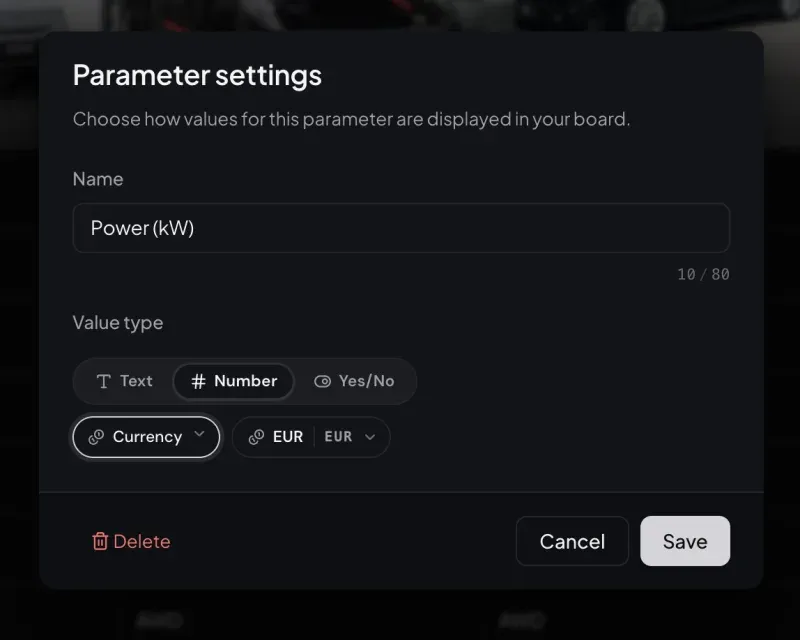
Inline add-parameter. Inside the item modal, adding a column on the fly uses the same three pills so you don’t get kicked out to a different screen just to classify a new field.
What about columns I already have?
They become text. The rule is simple: a parameter with no declared type renders exactly the way it used to — free-form strings, alphabetical sort. Flip the type when you’re ready, and Kortlist re-parses on the fly. Nothing in your data changes.
If you had currency columns from a previous preview, they migrate automatically to the new number → currency combination on your next board open. Same cells, same currency code, new home under the Number umbrella.
Why bother?
Two reasons.
Sort and compare are more honest. A “Price” column of currencies used to sort alphabetically unless you were careful to pad your numbers. Now it sorts numerically by the parsed amount. A “Runtime” column of plain numbers doesn’t care whether you wrote “60 min” or “60min” or “60” — they’re all 60.
Scan URL writes better data. The scraper now gets your column type
as part of the prompt. Ask for a boolean and Gemini returns "true" or
"false" — no synonyms, no “Yes, with caveats.” Ask for a currency and
it returns the numeric amount only, with the symbol stripped. Less
cleanup for you after every scan.
Room to grow
Number → plain and number → currency are the first two entries in a list that will get longer. Percentages, measurements (with unit), dates — each slots in alongside currency as another format without changing the shape of your board. We built the UI around a sub-format picker for exactly this reason.
Open app.kortlist.eu, pick a column that’s always been a little loose — a price, a weight, a spec that’s really just a yes/no — and give it a type. Small change, less visual noise, more honest sorting.